
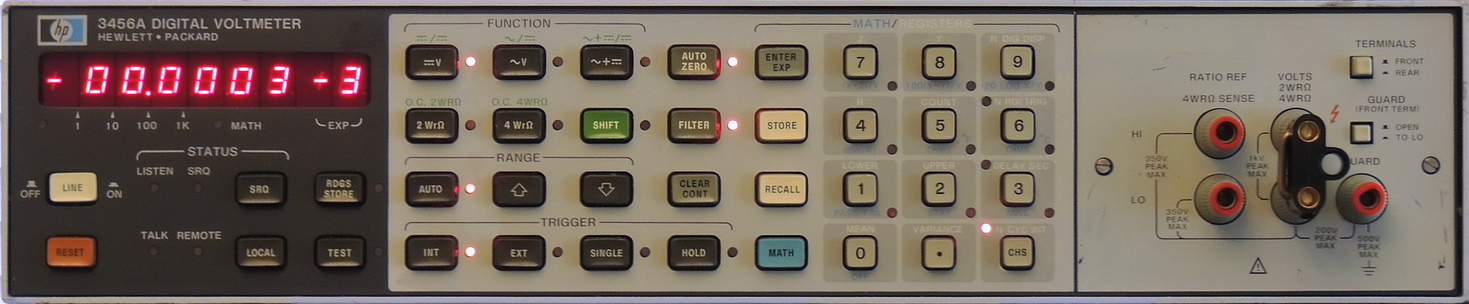
Cleanup, restoration, and calibration of a Hewlett Packard (HP) 6 1⁄2 digit 3456A Digital Voltmeter.
I had been looking for a newer Hewlett Packard 3457A digital voltmeter instead of the HP 3456A, to work on for several years now, without much luck in finding one that needed repairs but not totally trashed and a reasonable price.
That had given me some time to do additional research on some of the features, and general failure modes of that model. Even though the 3457A had plenty of nice features, I was starting to consider the HP 3456A instead. Even though the 3456A is an older design, it has what I consider an easier to read display, no calibration to loose because of a dead memory battery, decade ranges ( 1 V vs. 3V), and a lower noise front end.
By accident I came across a HP 3456A on Ebay that had some small issues and looked to be in good mechanical condition, so I put a low-bid on it.
I picked it up at a very reasonable cost, below my bid and with a low shipping charge.
The Hewlett Packard 3456A is a 6 ½ digit voltmeter with AC, DC, Ohms, and math functions. It has a resolution of 100 nV on the 0.1VDC range and a resolution of 1 mV on the 1,000.0 VDC range. AC volt range is from 1 uV to 1,000 volts, and resistance range is from 100 µΩ to 1 GΩ with 2 or 4 wire ohms connections.
It uses an integrating analog-to-digital (A‑to‑D) converter using the Multi-Slope II technique which was developed specifically for this model.
This unit is a 2201A series, was built in early 1983 and sold for around $3,700 ($9,500+ in 2020 U.S. dollars). The 2201A series did away with the rear fan, and moved the Outguard 5 volt power supply regulator to the rear panel.
This is not a small voltmeter, and measures 19.75″ long by 16.75″ wide by 3.5″ high (50.16 X 42.54 X 8.9 cm).

As usual I gave the new unit a full inspection upon arrival. Almost everything was in good shape, except there was quite a bit of residue and some corrosion along the back side near the power inlet. It looked like the meter had sat in some water for a period of time.
Luckily the damage wasn’t high enough to reach the boards or the power inlet, and only affected the frame, side panel , and the internal rear connector cover which wicked up the moisture and had lots of corrosion between it and the rear panel.
Most of the corrosion was removed with some mild cleaner and a brass brush, followed with a nylon brush and distilled water rinse. One Pozidriv screw needed to be replaced, but it was the only casualty.

After a thorough cleaning I powered up the unit with the bottom panels removed so that I could check the power supply. The power supply voltages are marked on the bottom side of the A10 board at the connector. All voltages were well within specifications, with very low AC ripple present. To my surprise all the electrolytic capacitors looked to be in very good condition. The electrolytic capacitors are high quality Nippon Chemi-Con and Sprague units, but they are still 38 years old and should be replaced. More on that later.

After running for several hours I ran thru all the performance checks, with only a few small issues. Several of the ranges were just out of calibration, and there was a small 1.2 uV offset with the input shorted. I also ran the front panel self-test which performs certain analog gain, offset, digital checks, including crossguard circuits, A‑to‑D converter, input switching, ohms measurement function, and the ac converter which all passed with no issues.

The calibrations were easy, and are done by adjusting multi-turn potentiometers located under the front terminal panel.
The offset adjust is a bit more difficult if it is out by more than 0.9 uV, which it was. The procedure requires rerouting the input amplifier’s input wire to a different pin, moving a jumper, and taking some measurements, before adding a select padding resistor between a terminal and resistor junction. The procedure is well documented in section 8‑F-19 of the manual.

One modification that I wanted to make was to better insulate the LM399 precision shunt reference on the A25 reference board.
I opted for the roVa Flex Plus Aerogel Insulation sheet, for it’s high insulation qualities on the top side of the board, and some Aspen Aerogel SPACELOFT™ mat for the bottom side.
I had read that the LM399 can have a ppm/K figure of between 0.1 to 0.2ppm/K if properly insulated with more than the plastic insulator that comes with the device.
I added cutouts per layer for the reference, resistor lead, and capacitor in the roVa Flex, and secured the top stack with cotton thread.
Currently I don’t have a way to test the effectiveness of this extra insulation, but in theory this should make a positive improvement.

The next step was replacing ALL the electrolytic capacitors thru out the unit. I will not be replacing any of the ceramic, film, mica, or hermetically sealed Tantalum capacitors.
So I had thought that replacing the capacitors on the A10 power supply board would be somewhat easy and straightforward as the board is easy to remove to work on.


Until I came to C5, the Sprague 4,000 uF at 15 volt capacitor.
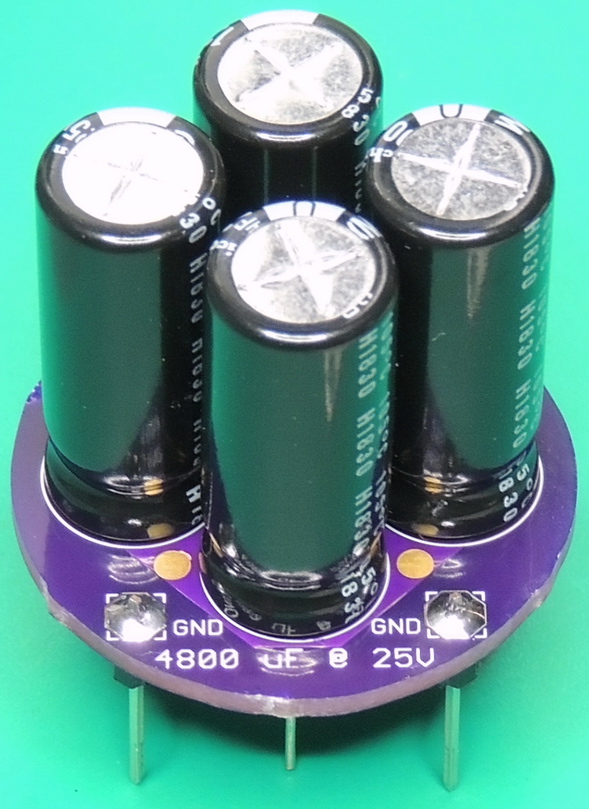
It is an odd 5 pin type, with 4 negative pins around the perimeter, and a strangely offset positive pin. I was unable to find any new capacitors with a similar pin configuration, so I made my own C5 adapter board.

The assembly is composed of four Nichicon 1,200 uF 25 VDC capacitors for a total of 4,800 uF @ 25 volts with an impedance of 4.25 mOhms. The Nichicon UHW1E122MPD capacitors are long life, high reliability, low impedance units rated at 105˚C for 10,000 hours, so they should hopefully last for another 38 years. I decided to use four capacitors to not only decrease the impedance, but to also increase the external surface area for better cooling.

I am also replacing the Corcom AC power line filter module with a new Kemet GL-2030F unit. The reason for this is that the module contains, or should contain X and or Y safety capacitors. These will also be 38 years old and should be replaced for safety reasons as these capacitors connect across AC line voltage, and/or from AC line to ground. This is an often overlooked component as the capacitors are hidden from view.


The other two capacitors to be replaced are the big axial 12,000 uF unit on the A3 board, and the small 1 uF @ 150 volt (orange) electrolytic on the A20 board.
The small red, white, and blue circles on the boards are PTFE (virgin Teflon) insulators, which can have a volume resistivity above 1017 (Ω/cm). These prevent stray currents from affecting measurement circuits.
Dirt, oils, and even fingerprints can seriously degrade the insulating properties of these connections, so extra care is required when working on these boards.

The Function selection buttons include: DCV, ACV, ACV+DCV, 2‑Wire Ohms, and 4‑wire Ohms. Using the Shift button selects the additional Functions: DCV/DCV Ratio, ACV/DCV Ratio, ACV+DCV/DCV Ratio, 2‑wire O.C. Ohms, and 4‑wire O.C. Ohms.
The numbered keyboard section is used for storing numbers into registers and selecting Math operations. Math operations include: % Error, Scale, Pass/Fail, dB, dBm, Null, Thermistor, and Statistics.
Here are the other boards, and different views inside the HP 3456A:
(Click on images for larger size view)
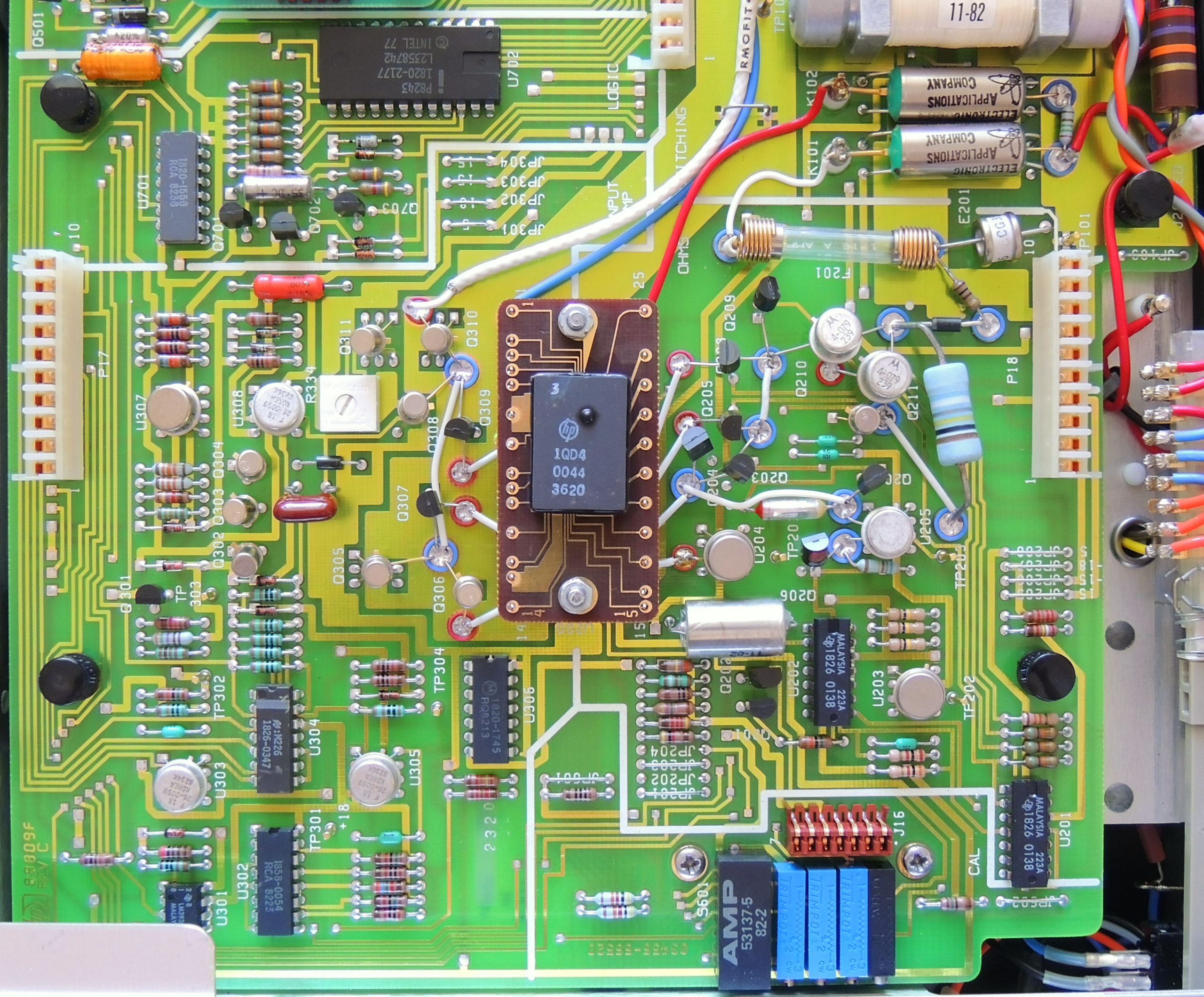


The brown modules on standoffs are the Fineline resistor network modules made by Hewlett Packard, and are composed of multiple precision resistors on a common substrate tailored for the requirements of each circuit board.
The A20 board has two of these modules designated as U200 and U500, and the A40 AC board has module U3.


So far I am glad that I acquired the HP 3456A instead of the 3457A voltmeter, even if I don’t have the other unit to compare it to.
If I found just the right HP 3457A I might be tempted to get it as to be able to compare the two meters. Until then I’ll just enjoy this one.
Here is a link to an interesting PDF article from the Hewlett Packard Journal from April 1981 (page 23) that discusses the design and capabilities of the HP 3456A.
Precision DVM Has Wide Dynamic Range and High Systems Speed
Oshpark C5 Adapter board shared project page
Higher resolution photos are available on my Flickr 3456A album
Hi! Thank you for this thoughtful post! I’ve replaced most of my power supply caps now and it’s helped a LOT. I have just a couple questions if it’s OK — I’ve not been able to find a replacement for that large 12,000uF capacitor. What did you use? Secondly, I got the adapter PCB — thank you for posting that to oshpark! It looks like the positive lead from one cap serves as the positive contact point on the main board. Those flanged pins used as ground points — what would I need there?
Hi Chris,

You are correct, I left one positive lead long. On the bottom of the circuit board there is a + pad circled, and labeled with “Do Not Cut”.
For the four ground pins I used Breakaway Pin Header’s, and the plastic header acts as a spacer to elevate the assembly above the main board.
I used a Vishay / Sprague #53D183G025JT6 — 18,000 µF 25 V axial, can aluminum electrolytic capacitor, to replace the 12,000 uF cap.
Greg (Barbouri)
Thank you! I love your site. Initially ran across it while looking at Power Designs supplies. Thanks for sharing your work.
I just acquired my own 3456A and I love it; especially the math features.
Are you aware that the Mostek ROMs can go bad? See:
https://bama.edebris.com/manuals/hp/3456a/
https://xdevs.com/fix/hp3456a/
https://www.eevblog.com/forum/testgear/quick-hp-3456a-rom-mod/
In addition to a cap replacement, I plan to socket the existing ROMs first then duplicate them onto a single EEPROM on an adapter board. Similar to this one: https://www.tindie.com/products/rcw/hp3456a-eprom-adapter-board/
Thank you for this detailed post. Especially for the C5 PCB design and cap part numbers. I’ll be checking out other projects of yours now 🙂
Bob